Katto turns long podcasts, streams and webinars into ranked, captioned vertical clips. How it works, who it's for, per-video pricing, and where it still falls short.
Sponsored. Written by Anthony, founder of Katto.
Most people who record long content already know the hard part isn't recording. It's what comes after: scrubbing through an hour of footage, finding the three minutes worth posting, cutting them to vertical, captioning them, and uploading them one platform at a time. That afternoon of work is why a lot of good podcasts, streams and webinars never become shorts at all.
Katto is an AI clipping tool built for that afternoon. You paste a link or upload a file, and it hands back vertical clips that are cut, reframed, captioned and ranked. This post explains how it works, who it's for, what it costs, and where it still falls short.
What Katto does
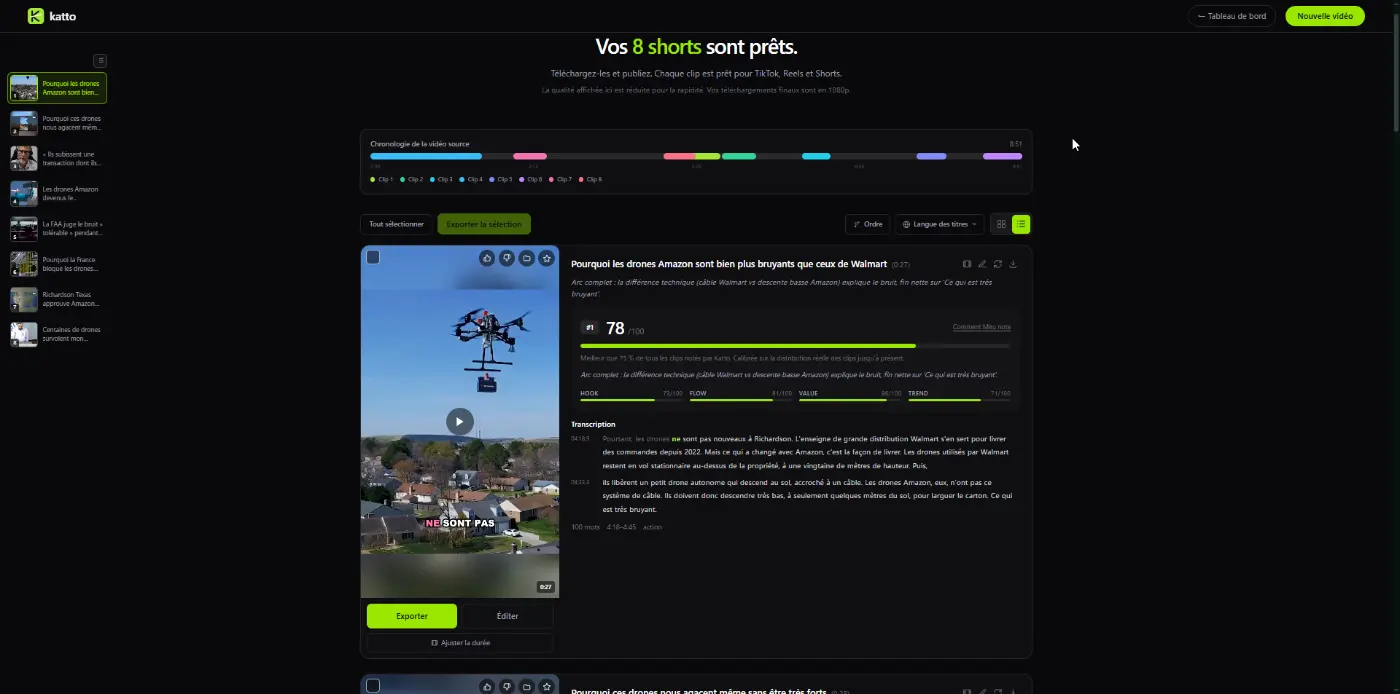
Katto takes one long video and returns a set of short, 9:16 clips. For each clip it:
- Finds the moment. A transcript-aware model reads the whole video and picks self-contained passages: a story with a beginning and an end, a sharp answer, a strong opinion.
- Ranks it. Every clip gets a score from Miru, Katto's scoring model, broken down into Hook, Flow, Value and Trend. You see why a clip ranked where it did, so you know what to post first.
- Reframes it. Faces are tracked so the speaker stays in frame. Two-person conversations can switch to a split screen, and gaming content with a facecam gets a stacked layout (camera on top, gameplay below).
- Captions it. Captions in 99 languages, timed word by word in 41 of them and sentence by sentence in the rest, with proper nouns corrected by AI so a guest's name doesn't come out mangled.
Then you can edit any clip in the browser, export it with an SRT file, or publish it straight to social platforms from the same screen, and later see how each published clip performed.
How it works, step by step
- Paste or upload. A link from YouTube, Twitch, Vimeo, Zoom, Google Drive and other sources, or a file from your computer.
- Katto processes the video. It transcribes, detects scene changes and speakers, picks the moments, and renders the clips. You don't have to wait on the page: the first clips appear as soon as they're ready.
- Review the ranked clips. They're sorted by score. If you want more than the model picked, the runners-up it kept in reserve are one click away.
- Edit if you want to. Trim, change the caption style, move the title, add music or b-roll.
- Export or publish. Download the MP4 and SRT, or publish to the connected platforms.
New accounts don't even need to upload anything to see the result. They can open a finished example job and edit real clips straight away.
On autopilot: from a new upload to a scheduled post
Pasting links works, but the point is not to have to. Two features take you out of the loop, and a third is on its way:
- Followed channels. On paid plans, you can follow up to 5 YouTube channels. When one of them publishes a new video, Katto clips it automatically, without you opening the site. Shorts are skipped, you can ignore videos above a length you choose, and each clipped video counts as one video of your monthly plan. When your monthly quota runs out, nothing new is clipped until it resets, and the waiting videos are picked up then.
- Posting queue. On Creator, you set your posting slots once: days, times, time zone and platforms. Every clip you approve then goes into the next free slot and publishes itself at that time, the way a Buffer queue works. No need to schedule each clip by hand.
- A Chrome extension. It adds a "Clip with Katto" button under YouTube videos and Twitch VODs, plus a way to mark one exact moment to clip. Get it on the Chrome Web Store.
Put together, the workflow is: a new video goes live, Katto cuts the clips, you approve the ones you like, and they go out at your times.
Who it's for
- Podcasters who want a week of shorts from each episode.
- Streamers who want highlights from a VOD without editing it by hand. The stacked facecam layout exists for them.
- Interview and talk-show formats, where two or more people speak and the frame has to follow the conversation.
- Educators, coaches and webinar hosts whose best material is buried in the middle of a long session.
If you mostly film short-form natively, you probably don't need a clipping tool at all. Katto is for people whose content starts long.
Pricing: counted in videos, not credits
Katto counts usage in videos per month. There are no credits that convert into minutes and no minutes that expire mid-cycle. If your plan includes 10 videos, you can clip 10 videos, each up to the plan's length limit.
| Plan | Price | Videos / month | Max length per video | Output |
|---|---|---|---|---|
| Free | €0, no card | 2 | 30 min | 720p, small watermark |
| Solo | €8.90/mo, or €4.90/mo billed yearly (€58.80/year) | 10 | 60 min | 1080p, no watermark |
| Creator | €14.90/mo, or €11.90/mo billed yearly (€142.80/year) | 25 | 90 min | 1080p, no watermark, AI dubbing in 19 languages, scheduling |
Creator comes with a 7-day trial. Current details are on the pricing page.
How it compares
The clipping market is crowded: OpusClip, Klap, Vizard, Submagic and others all turn long videos into shorts, and several are very good.
Katto's main difference is the billing model: plans are based on the number of source videos, not on a pool of credits or minutes. That doesn't make it the cheapest option in every case. If you upload many short videos, a minutes-based plan may suit you better. But if your sources are 60 to 90-minute podcasts and interviews, you know in advance exactly how many you can clip each month.
Two other things I've put work into:
- Multi-speaker footage. Conversations can switch to a split screen, and gaming content gets a stacked facecam layout.
- An explained ranking. Each score comes with its Hook, Flow, Value and Trend breakdown, rather than a list of clips in no particular order.
We keep a sourced, side-by-side comparison with OpusClip on our comparison page. Competitors change their plans often, so check the date on any comparison you read, including ours.
What still isn't perfect
Katto is founder-built, and there are still areas I'm improving:
- Cut points. Most clips start and end on a clean sentence, but now and then a clip starts a beat early or ends a moment too soon. You can fix it with the trim handles in the editor, and I'm still working on it.
- Fast action. Reframing follows faces well. Sports and fast gameplay are harder: the frame doesn't always follow the action as closely as a human editor would.
- Long sources take time. A one-hour episode is ready in minutes, not seconds. The first clips show up before the whole job is finished, which helps.
- The model picks, you decide. The scores are a strong first filter, not a guarantee of views. You still know your audience better than any model.
Getting started
- Create a free account at katto.tech. No card is needed.
- Open the example job to see what finished clips look like, or paste your own link.
- If you work mainly with long recordings, the long video to shorts guide walks through the workflow.
Katto at a glance
- What it is: an AI video clipper that turns long videos into ranked, captioned vertical clips.
- Inputs: links from 13 sources (YouTube, Twitch, Vimeo, Zoom, Google Drive, Dropbox, Loom and more) or a file upload.
- Captions: 99 languages, word-level timing in 41.
- Layouts: face tracking, split screen for conversations, stacked facecam for gaming.
- Automation: followed YouTube channels clipped automatically, a posting queue with fixed slots, and a Chrome extension.
- For developers: a REST API and an MCP server, so AI agents can create clip jobs too.
- Pricing: free plan, then per-video plans from €4.90/month billed yearly.
Questions readers ask
Do I need to install anything? No. Katto runs in the browser. An optional Chrome extension saves you copying the link of a YouTube video.
Can I edit the clips? Yes. You can trim them, change the captions and titles, and add music or b-roll before exporting.
What happens to my clips on the free plan? Free clips are kept for 72 hours, so download the ones you want to keep. Paid plans keep them.
Does it work in languages other than English? Yes. Captions work in 99 languages, and Creator adds AI dubbing in 19.
Is there an affiliate program? Yes: 25% recurring for 12 months on subscriptions you refer. Details are on the affiliate page.
About Katto
Katto is an AI clipping tool for podcasters, streamers and anyone whose content starts long. It finds the moments worth posting, ranks them, reframes and captions them, and lets you publish from one place. Try it free at katto.tech.


Reviewed by FoundrList before publishing. Editorial policy